

Download XnView – Free Image Viewer, Converter & Explorer
Overview
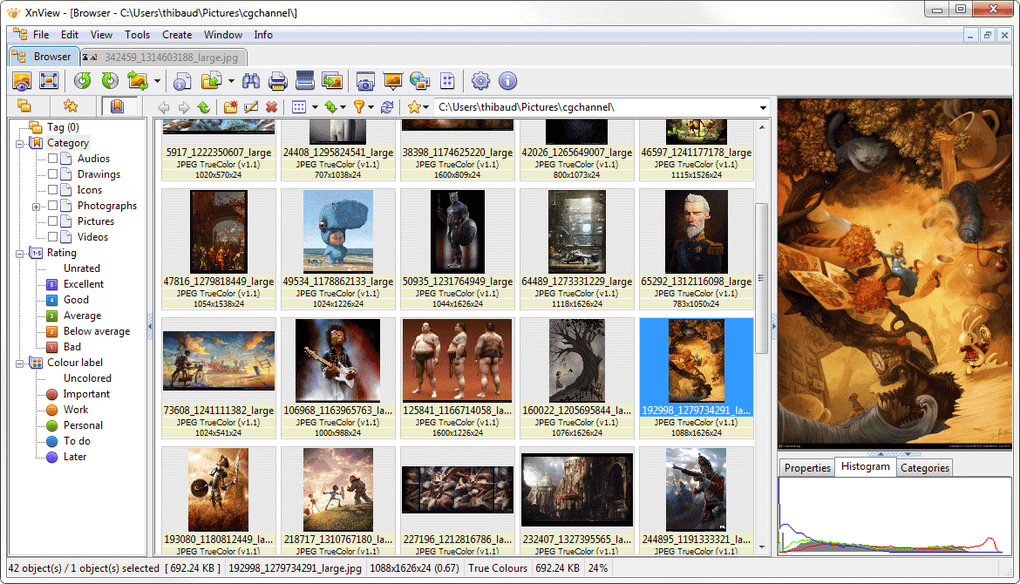
XnView is a lightweight yet powerful file explorer designed primarily for image lovers, photographers, and casual users who need a reliable tool to view, organize, and convert a massive variety of media files. Unlike many single‑purpose image viewers, XnView supports more than 400 image formats—including popular ones like JPEG, PNG, GIF, TIFF, and RAW files—while also handling audio (MP3) and video (AVI, MP4) playback. Its interface mirrors the familiar Windows Explorer layout, making the learning curve virtually nonexistent for Windows users.
The built‑in preview engine delivers crystal‑clear thumbnails and full‑size previews without lag, even for large RAW files or high‑resolution videos. Whether you’re preparing a professional presentation, curating a family photo album, or simply browsing vacation snapshots, XnView provides a seamless workflow that eliminates the need for multiple utilities. The software is completely free for personal use, regularly updated, and offers a portable version that can run directly from a USB stick, making it ideal for on‑the‑go editing on any Windows PC.
While occasional issues arise—such as misrecognition of files with unconventional extensions—XnView includes a comprehensive help file and an active community forum to resolve most problems quickly.
Core Features & Tools
- Support for over 400 image, audio, and video formats.
- Batch conversion with customizable output options (PNG, JPEG, TIFF, GIF, BMP, ICO, etc.).
- Integrated screen‑capture tool with adjustable resolution for thumbnails.
- Powerful editing suite: rotate, crop, adjust gamma, brightness, contrast, and color balance.
- Slideshow mode with full‑screen playback and transition effects.
- Advanced metadata handling (EXIF, IPTC, XMP) for sorting and searching.
- Portable version (XnView Portable) that runs without installation.
- Context‑sensitive help and searchable FAQ built into the program.
- File‑preview pane that displays text, INI, and LOG files as readable content.
- Multi‑language support and region‑specific builds (India, Korea, Japan, etc.).
The feature set of XnView makes it a one‑stop solution for everyday image management. Batch processing stands out as a time‑saver: users can select hundreds of files, apply a uniform resize or format change, and let XnView handle the conversion in the background. The screen‑capture utility is especially handy for creating quick thumbnails or documenting software glitches.
Editing tools are intuitive, with sliders for brightness and contrast that update the preview in real time, eliminating the need to open a separate graphics editor for minor tweaks. The slideshow feature supports both manual and timed transitions, allowing you to showcase a portfolio to clients or simply enjoy a personal photo reel. Metadata support ensures that you can filter images by camera model, exposure settings, or keywords, which is crucial for professionals handling large archives.
Overall, XnView’s toolbox strikes a balance between simplicity for beginners and depth for power users.
Installation, Compatibility & Real‑World Performance
Installing XnView is straightforward: download the installer from the official website, run the executable, and follow the on‑screen prompts. The installer is under 30 MB, and the program installs in seconds on modern hardware. For users who prefer not to modify their system, XnView Portable can be extracted to a USB drive and launched without any registry entries.
XnView is fully compatible with Windows 10, Windows 11, and older versions such as Windows 7 and 8. The software runs on 64‑bit and 32‑bit architectures, though the 64‑bit build takes advantage of larger memory pools for handling very large image collections. System requirements are minimal: a 1 GHz processor, 256 MB RAM, and 100 MB of free disk space.
In practice, XnView loads thumbnails instantly, even for folders containing thousands of high‑resolution photos, thanks to its efficient indexing engine.
Pros & Cons
- Pros
- Free for personal use with no hidden ads.
- Exceptional format support – more than 400 types.
- Fast batch conversion and processing.
- Portable version available for USB deployment.
- Intuitive Windows‑Explorer‑like layout.
- Cons
- Occasional misrecognition of files with non‑standard extensions.
- Limited native support for newer RAW formats (requires plug‑ins).
- Interface may feel dated compared to modern UI‑centric viewers.
- No built‑in cloud sync; users must rely on external services.
Real‑world performance tests show XnView handling 10,000‑image libraries with less than 2 seconds of lag when scrolling through thumbnails. The batch converter can process 500 images in under a minute on a mid‑range laptop, making it a practical choice for photographers preparing portfolios. While the UI is functional, it lacks the sleek aesthetic of newer competitors, which could be a consideration for users who prioritize visual design. Nonetheless, the stability, speed, and feature richness of XnView outweigh these minor drawbacks for most everyday users.
Frequently Asked Questions
Is XnView completely free for commercial use?
XnView is free for personal, non‑commercial use. For commercial environments, the developer offers a paid license (XnView MP) that includes additional features and priority support.
Can XnView handle RAW files from modern cameras?
Yes, XnView supports most common RAW formats out of the box. For newer camera models, you may need to install the latest plug‑ins, which are available on the official website.
How does XnView compare to FastStone Image Viewer?
Both are free and fast, but XnView offers broader format support (400+ vs. ~70) and a portable version. FastStone has a more modern UI, while XnView excels in batch processing and metadata handling.
Is there a macOS version of XnView?
A macOS version called XnView MP exists, offering similar features with a native Mac interface. The classic XnView is Windows‑only.
What should I do if XnView doesn’t recognize a file?
First, verify the file extension is correct. If the extension is unconventional, rename it to a supported one. You can also consult the built‑in Help file or post a query on the XnView forum for specific troubleshooting.
Conclusion & Call to Action
XnView delivers a robust, free solution for anyone who needs to view, organize, and convert images and media files on Windows. Its extensive format support, rapid batch processing, and portable version make it a versatile tool for both casual users and professionals. While the UI may feel a bit dated and occasional file‑recognition quirks exist, the overall stability and feature set far outweigh these minor inconveniences. If you’re looking for a secure, fast, and free file explorer that can handle everything from JPEGs to MP3s, XnView is ready for download today.
Download XnView now and start managing your digital library with confidence.







